Most websites treat images as decoration. Search engines and AI tools treat them as data. The gap between those two views is where rankings and citations are lost.
Alt text best practices have moved beyond an accessibility checkbox. Google Images, AI Overviews, and LLM-powered search now read alt attributes to understand, rank, and cite visual content. A missing or lazy image description is a missed retrieval opportunity.
This guide covers the rules Google and W3C actually recommend, a proven 4-part formula, and real examples from industry leaders. It also explains where captions fit, because alt text and captions do different jobs.
What Is Alt Text And Why It Matters Now
Alt text is a short written description of an image, added through the HTML alt attribute. It serves three audiences at once. Screen-reader users hear it read aloud. Search engines index it to rank images. AI systems read it to decide which visuals to cite in generated answers.
The 2026 context raises the stakes. Google Images no longer lives only in the Images tab. Image results now surface across web results, AI Overviews, Discover, and Google Lens. Every one of those placements depends on text signals, and the alt attribute is the strongest.
The core problem is that most sites write labels, not descriptions. A label says "Six key SASE benefits." A description says what the image actually communicates. That gap is why the 2026 WebAIM Million report still flags 16.2% of home page images with missing alternative text, and why even completed alt tags fail to earn citations.
7 Alt Text Best Practices From Google And W3C
These seven practices consolidate guidance from Google Search Central, Google's technical writing documentation, and the W3C Web Accessibility Initiative. None of them are opinions. Each one traces back to a published standard, and each one is a habit that image-heavy pages should treat as non-negotiable.
The principle behind them comes from Google directly. In a Search Central office hours session, John Mueller advised describing what an image means for the page, not just what it contains. He has also cautioned against auto-generating alt text with AI, since AI recognizes objects but misses page context. The seven rules below turn that principle into a repeatable process.
- Describe what the image communicates, not its topic. Alt text should convey the message of the visual, written in the context of the surrounding section. A product screenshot on a pricing page does a different job than the same screenshot in a tutorial. The alt text should reflect that difference. When in doubt, write what a colleague would say when describing the image over a phone call.
- Keep it to a phrase or one to two sentences. Simple images need only a short phrase. Complex charts and infographics can run 125 to 160 characters. End complete sentences with a period, which creates a natural pause for screen readers. Anything longer belongs in the surrounding body copy, not the attribute.
- Accessibility first, keywords second. Keywords belong in alt text only when they fit naturally. Google warns that stuffing alt attributes with keywords creates a negative user experience and can flag a site as spam. The safest approach is to write the description first, then check whether a keyword already landed. Forcing one in afterward almost always reads as spam.
- Never repeat the heading or open with "Image of." Screen readers already announce the element as an image, so those openers add pure noise. Copying the section heading into the attribute is equally wasteful. It doubles the same information and describes nothing about the visual itself.
- Skip design cues, keep the data. Colors, arrows, gradients, and icon styles rarely matter to the message. Specific numbers do. An alt tag that says "bar chart comparing costs" undersells a visual showing a 40 percent saving. When the data is the point, the data belongs in the alt text.
- Use descriptive file names. A file named alt-text-formula.png sends a relevance signal before a crawler reads a single attribute. A file named img_0231.png sends nothing. File names are a light ranking clue, but a real one, and renaming takes seconds at export.
- Use an empty alt attribute for decorative images. The W3C decision tree recommends alt="" for purely decorative visuals, which tells screen readers to skip them. Removing the attribute entirely is not the same thing. Some readers respond by announcing the raw file name, which is worse than silence.
Applied together, these rules produce alt text that serves all three audiences at once. The next section shows what that looks like against real examples.
Label Vs Descriptive Alt Text: Examples Compared
A label names what's in the picture. A description tells the reader what the picture is for. Google's own documentation shows the gap using a plate of waffles as the test case.
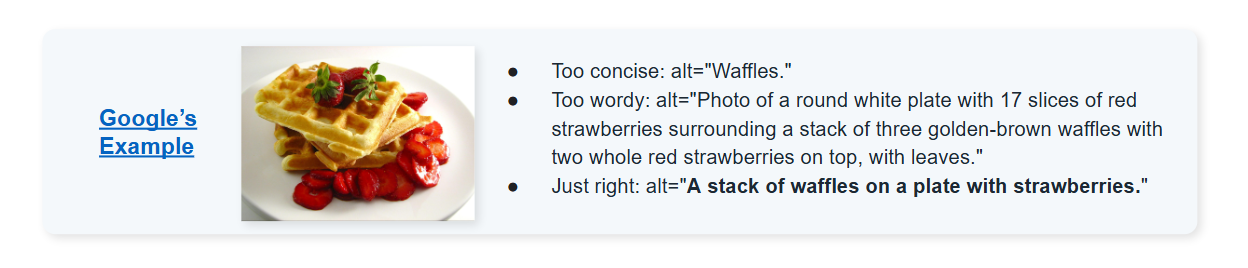
The label confirms the photo exists. The description tells an AI system, or a screen reader, what it actually shows. Only one of the two earns a citation.
4 Alt Text Mistakes To Avoid
- Empty alt attributes on informative images. The alt="" pattern belongs on decorative visuals only. On charts and diagrams, it erases the content for screen readers and crawlers alike.
- The same alt text duplicated across images. Identical descriptions tell crawlers the images are interchangeable. Every informative image needs a unique description.
- Keyword stuffing. Stacked keywords read as spam and hurt visually impaired users first. One natural keyword is the ceiling.
- Repeating the caption or heading verbatim. Screen readers announce both, so duplication doubles the noise. Alt text should add what the surrounding text does not already say.
How Alt Text Improves SEO And AI Search Visibility
Alt text does two jobs. It helps images rank in visual search. It helps pages get cited in AI answers.
The ranking side has a clear gap. Backlinko analyzed 65,388 Google Lens results and found only 11.4% of ranking images had alt text matching the search term. In simple terms, most images that rank today are barely optimized. Pages that write proper alt text compete against almost nobody.
The AI side is where the reach is. Google's AI Overviews now serve 2 billion monthly users, and the feature shows on roughly half of all US queries. These answers pull images from the pages they cite.
Descriptive alt text tells the system what an image proves, which makes it worth selecting. An image without it never enters the conversation. Measuring whether those citations actually happen requires AI search optimization tools built for LLM visibility tracking.
How AI Overviews And LLMs Read Your Images
AI systems do not evaluate pixels when choosing citations. They parse the HTML around the image. Four signals do the work: the alt attribute, the figcaption, the file name, and the surrounding text.
When these agree, the image becomes a citable claim. Alt text reading "bar chart showing 40 percent cost reduction" hands an LLM a quotable fact. Alt text reading "chart1" contributes nothing.
That is why labels fail in AI search. A label gives the model a topic. A description gives it a statement worth repeating. Models cite statements.
How Alt Text Improves User Experience And Engagement
The engagement case for alt text runs deeper than rankings. Five effects compound across a page:
- Inclusive access. Screen-reader users get the full meaning of every infographic, not just a label. This expands the addressable audience and meets WCAG 2.2 success criterion 1.1.1, a Level A requirement.
- Resilient UX. Alt text renders when images fail to load on slow connections or behind blockers. The page still communicates instead of showing broken-image icons.
- Skimmability and dwell time. Visible captions give scanning readers an instant takeaway per visual. That lifts comprehension, time on page, and scroll depth.
- Qualified engagement. Descriptive alt text wins image-search and AI-citation traffic that arrives with clear intent. Visitors who know what to expect bounce less and engage more.
- Brand trust. Accessible experiences signal care and credibility. The 2026 WebAIM Million report found detectable WCAG failures on 95.9% of top home pages, up from 94.8% in 2025. Every failure erodes trust with affected users.
Real Alt Text Examples From Industry Leaders
Most brands treat alt text as a compliance checkbox. A few treat it as a chance to feed AI systems a fact worth repeating. The difference shows up fast once you look at what they actually publish.
Cloudflare
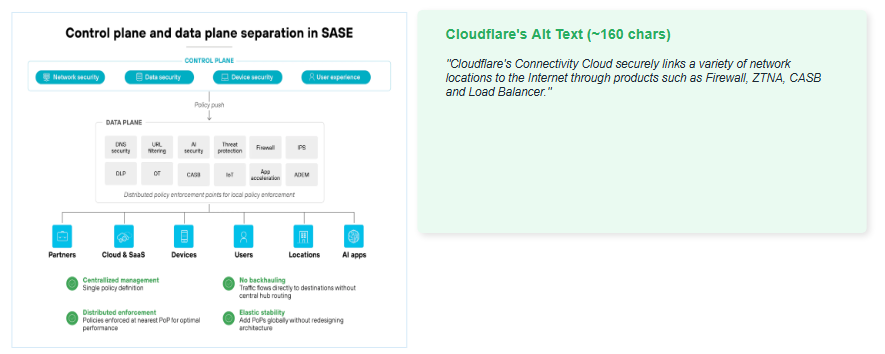
Every infographic on Cloudflare's reference architecture pages follows the same discipline. Here's one, describing a SASE diagram:
"Cloudflare's Connectivity Cloud securely links a variety of network locations to the Internet through products such as Firewall, ZTNA, CASB and Load Balancer."
Notice what's missing. No mention of colors, icons, or where anything sits on the page. Just what the diagram is telling you, in one sentence under 160 characters. That's the standard to hold any product or architecture image to.
Google's own Image SEO documentation includes this line as an example of what not to do:
"puppy dog baby dog pup pups puppies doggies pups litter puppies dog retriever labrador wolfhound setter pointer puppy jack russell terrier puppies dog food cheap dogfood puppy food"
This is what happens when a team tries to rank for every variation of a keyword instead of describing the photo. It reads as spam to a crawler and as noise to anyone using a screen reader. One accurate sentence does more work than a list of keywords ever will.
Apple
This one isn't a style guide sample; it's live on Apple's own newsroom right now, describing a Magnifier screenshot:
"An iPhone screen on the left shows the Magnifier app capturing an energy bill as the user asks 'How much is the bill for?' while an iPhone screen on the right provides a detailed response about the total amount due as well as the due date."
Two screens, one interaction, told beginning to end. If you're writing alt text for a before/after or side-by-side screenshot, this is the shape it should take: what the user did, and what they got back.
The 4-Part Formula Behind Cloudflare's Alt Text
Cloudflare's alt text isn't written freehand. It follows the same four-part structure every time:
"Cloudflare's Connectivity Cloud securely links a variety of network locations to the Internet through products such as Firewall, ZTNA, CASB and Load Balancer."
- Subject and product. The sentence opens by naming the company and the product responsible: Cloudflare's Connectivity Cloud.
- Action verb. One verb states what that product does: it securely links.
- What it connects or shows. The sentence names what's being connected: a variety of network locations to the Internet.
- Named components. It closes by naming only the parts that carry meaning: Firewall, ZTNA, CASB, and Load Balancer.
Use this structure for any product infographic. Fill in the four parts, keep the full sentence under 160 characters, and the alt text writes itself.
Alt Text vs Captions: What Goes Where
Alt text and captions do different jobs, and mixing them up wastes both.
The one rule: never duplicate the two. Screen readers announce both, so identical text doubles the noise and adds nothing. Google's documentation treats them as separate fields serving separate readers.
The competitive angle is closer. Almost no major vendor pairs descriptive alt text with visible figcaptions. Doing both on the same page is an open first-mover opportunity, especially for the prompt-style queries that trigger AI Overviews. Those queries are findable in first-party data using Google Search Console regex filters.
Make Descriptive Alt Text Your Standard Practice
Turning this into a habit takes five steps. Set a house style based on the seven best practices above. Apply it to every new image immediately. Audit and backfill high-traffic pages first.
Build alt text and caption fields into your design and CMS workflow, so compliance holds without reminders. Then track image search impressions, AI citations, and accessibility scores to confirm it's working.
Descriptive alt text compounds. It strengthens SEO, AI visibility, accessibility, and trust at once, for near-zero cost.
LeadWalnut's 4.9/5 Clutch rating reflects this same discipline, applied to content and SEO for enterprise clients every day.
FAQ
Is there a character limit for alt text?
No. HTML sets no limit and screen readers announce the full text without cutting off. The 125-character convention exists for brevity and screen reader comfort, not because browsers or assistive technologies truncate anything.
Is alt text a confirmed Google ranking factor?
Yes, for Google Images, where it directly influences which images rank. In regular web search, Google treats alt text as normal page text, so it contributes context but carries no separate ranking weight.
How to check if an image has alt text?
Right-click the image and choose Inspect to view the alt attribute in the HTML. For site-wide checks, tools like WAVE, Lighthouse, and Screaming Frog flag every image missing a description automatically.
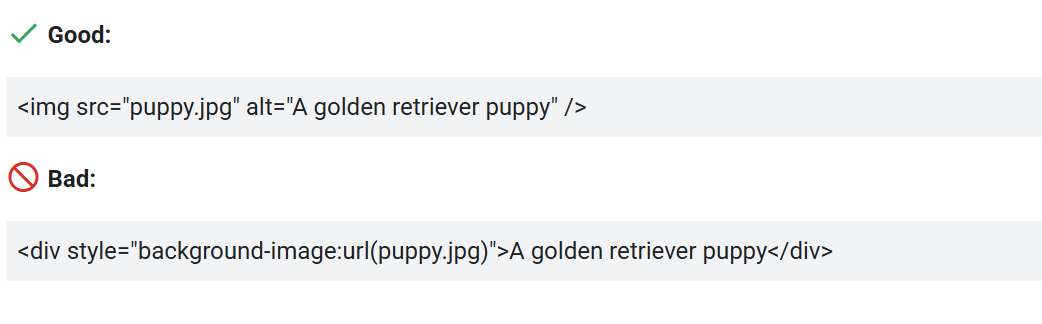
Do CSS background images need alt text?
No. Background images cannot carry alt attributes at all. Any image that conveys meaning belongs in an img tag with proper alt text, while CSS should hold purely decorative visuals only.
How to add alt text in WordPress?
Open the image in the Media Library and fill the Alternative Text field. The value applies wherever that image appears. Page builders like Elementor also expose the same field per image block.
Does alt text matter on social media platforms?
Yes. LinkedIn, Instagram, and X all provide manual alt text fields. Filling them improves accessibility for screen reader users and gives platform algorithms clear text signals about what each image actually shows.



How can LeadWalnut help?

Related Articles
How to Earn Citations from High-Authority Publications
Why Backlinks Are Now The Primary Driver Of Brand Mentions In AI Answers