From topic idea to CMS-ready content in minutes.
Turn any topic into a full, search-ready blog article that lands in your Webflow CMS as an editable draft. No writer queue, no copy-paste, no Designer rebuild.
- ✓ A publish-ready SEO article, without a single handoff
- ✓ Content you can trust, every fact backed by a live source
- ✓ Your next post waiting in Webflow, not in a writer's queue
Start publishing in minutes
Free skill file delivered to your inbox.
Check Your Inbox!
We've sent the Blog Automation AI Agent .md file with
full setup instructions for Claude and Webflow.
 4.2
4.2
See the Blog Automation AI Agent in Action.
How to Run the Blog Automation AI Agent
No coding required. No complex setup. Just answer a few questions and approve the draft.
Get the Skill
Enter your details above. We'll email you the .md skill file.
Open in Claude
Upload the .md file to Claude.ai or Claude Desktop with Webflow connected.
Answer & Approve
Tap through the cards; approve the brief, then the article.
Draft in Webflow
The post appears in your CMS, ready for review and publish.
This agent must run on Claude, not ChatGPT, Gemini, or other AI tools
The Blog Automation AI Agent is built for Anthropic's Claude and connects directly to your Webflow CMS through the Webflow MCP integration to create the draft. Running it elsewhere produces rough copy with no way to push it into your site.
Generic AI Prompts vs. the Blog Automation Framework.
The gaps a "prompt and pray" workflow leaves behind, closed on every post by the Blog Automation AI Agent.
| Step | Generic AI Prompts (ChatGPT, Gemini) | LeadWalnut Blog Automation AI Agent |
|---|---|---|
| Brief | Skipped — you prompt and pray | Built from tappable inputs, shown for approval |
| Writing | Generic copy, invented facts | Editorial checklist, facts verified against live sources |
| SEO & AI Search | Not structured to rank or get cited | Answer-first structure, meta, FAQs built in |
| Formatting | A wall of text to clean up | Takeaways, CTAs, tables pre-styled |
| Loading to CMS | Copy-paste into Webflow by hand | Pushed straight to Webflow as a draft |
| Going Live | One paste away from a mistake | Stays a draft until you publish it |
Why the agent's output doesn't read like AI copy.
Every draft follows the same editorial checklist LeadWalnut's human editors follow on client blogs.
Written in your brand voice, in third person, from your saved files.
Answer-first structure with meta, headers, and FAQs built in.
Every statistic and claim verified against a live source.
Two human approval gates — the brief, then the article.
Work samples, straight from LeadWalnut's Webflow CMS.
Seven full-length blog drafts created in one day, ready to publish. No writer queue, no dev tickets.
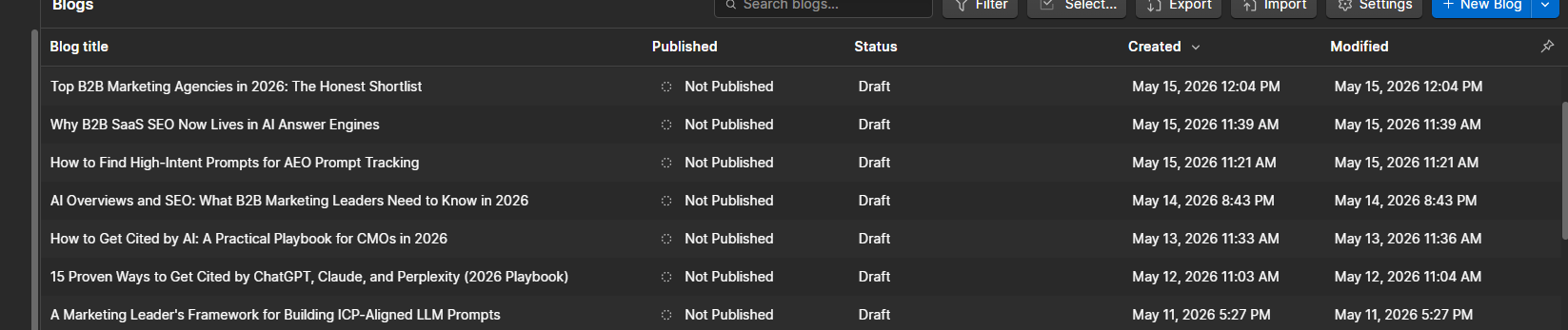

What the Blog Automation Agent actually builds
Below is an example of what it provides as output.
Blog Automation AI Agent: Output
A complete SEO-optimized blog draft — structure, meta data, and Webflow-ready formatting.
How the Blog Automation AI Agent Works
Battle-tested on live B2B enterprise blogs, running the same editorial checklist our team uses for clients.
Answer a Few Questions
- New blog, or optimize an existing one
- Topic, keyword, funnel stage, audience
- Brand voice pulled from your saved files
- You approve the brief before writing starts
A Full, Search-Ready Article
- Answer-first structure, meta, headers, FAQs
- Internal links, trust markers, two CTAs
- Every fact checked against a live source
- Written in your brand voice, in third person
A Draft in Your Webflow CMS
- Editable draft in your blog collection
- Takeaways, CTAs and tables pre-styled
- Never published automatically
- Final polish and go-live on your schedule
For marketers who want quality content, at scale.
Editors, SEOs, and lean marketing teams who need a reliable content engine, not another prompt to babysit.