What Claude Cowork Actually Is (And Why It Is Different From ChatGPT)
Claude Cowork is an agentic AI teammate built into the Claude desktop, mobile, and web app. It does not just answer prompts. It plans, executes, and delivers multi-step work across your files, apps, and connectors. ChatGPT responds inside a chat window. Cowork works inside your actual workflow.
For SEO and GEO teams, that shift matters. A prompt gives you a paragraph. An agent gives you a finished deliverable. Anthropic itself describes Cowork as "less like a back-and-forth and more like leaving messages for a coworker."
That is the core of Claude Cowork strategies for SEO and GEO teams. Stop typing prompts. Start assigning outcomes. Treat every recurring task as something a teammate can own end-to-end.
Inside the Cowork Toolkit: Dispatch, Schedule, Skills, And Templates
Claude Cowork is not one feature. It is a toolkit with four building blocks. Dispatch moves work in and out. Schedule runs work on a clock. Skills lock in repeatable workflows. Templates give you a starting point. Together, they make Claude Cowork for marketing teams an operating layer, not a chat window.
Dispatch: Sending Insights, Briefs, and Decks to Teammates And Tools
Dispatch is how work moves in and out of Cowork. You trigger a task from your phone, email, Slack, or WhatsApp. Cowork picks it up, runs the job on your desktop, and returns the finished output. According to Anthropic's official Cowork help docs, Dispatch also lets Claude drive apps like Excel and internal dashboards through computer use. For SEO teams, that means a brief written on the commute becomes a deck by the time you open your laptop.
Schedule: Putting Recurring Reports on Auto-Pilot
Schedule handles anything that happens on a clock. Weekly ranking pulls. Monday morning traffic snapshots. Monthly backlink QA. You set the time, the source, and the output format once. Cowork runs it every cycle without a prompt.
As Fortune reported after testing the feature, scheduled Cowork tasks can compile Slack, email, and calendar data into daily briefings before your first meeting. For SEO managers, this replaces the Monday scramble with a report already sitting in your inbox.
Skills: Reusable Named Capabilities Your Whole Team Can Run
Skills are the highest-leverage part of the toolkit. A Skill is a named, reusable workflow that any teammate can trigger by name. Instead of rewriting a prompt, you say "run the backlink QA skill" or "run the content coverage skill."
The workflow, the checks, and the output format stay locked. New team members get expert output on day one. The LeadWalnut Claude Skills Hub hosts free GEO Skills teams can plug in and run, covering content refresh, backlink QA, keyword research, and coverage analysis.
Templates: Plug-And-Play Prompts For The Ten Most Common Marketing Workflows
Templates sit one level below Skills. They are structured starter prompts for the workflows every marketing team runs. Content briefs. Competitor tear-downs. QBR outlines. Weekly stand-up notes. You open a template, drop in your inputs, and Cowork returns a first draft.
No blank page. No prompt engineering. LeadWalnut's ready-to-use workflow templates cover the ten most common SEO and GEO tasks so teams can start executing on day one.
The Agentic Framework: How Reliable Marketing Agents Are Built
Reliable marketing agents do not happen by accident. They follow a framework. Every Claude Cowork strategy that survives past the demo is built on the same five blocks.
The 5 Building Blocks Every AI Agent For SEO Workflows Needs
- Structured Input is where most agents fail before they start. The agent needs to know exactly what it receives every run. An Ahrefs export with named columns. A GSC query file for a fixed date range. A URL list and the category context around it. Loose inputs produce loose outputs, every time.
- Process is the step order the agent follows. Classify the data. Filter out the noise. Analyze what is left. Score it. Draft the output. Writing the sequence down is what separates an agent from a prompt. The order does not change because the analyst is having a bad week.
- Structured Output fixes the shape of the deliverable before the work starts. An Excel file with named tabs. A doc with a locked header order. A five-bullet email in a set format. When the shape is fixed, the output drops straight into the client deck. Nobody reformats anything.
- Feedback Loop is how the agent gets better instead of repeating the same mistake. A reviewer flags a bad row or a weak recommendation. That correction gets written back into the Skill as a rule. The next run already knows. Agents without a feedback loop stay exactly as good as the day they were built.
- Guardrails are the rules the agent cannot break, no matter what the input looks like. Word count ceilings. Banned claims. Every stat needs a source. Nothing publishes without human approval. Guardrails are what make an agent safe to hand to a junior teammate on their first week.
Skip a block and the agent breaks in production. Skip guardrails and it breaks publicly. This mirrors Anthropic's own engineering guidance on building effective agents: keep the design simple, show planning steps, document tools tightly. Each block is built live inside a real SEO workflow in past workshop recordings.
Why Structured Agents Beat Clever Prompting
A clever prompt is a one-time performance. A structured agent is infrastructure. The difference shows up on run fifty, not run one.
Clever prompting scales with the person writing the prompt. Structured agents scale with the team.
Why SEO and GEO teams are the highest-leverage use case for Cowork
SEO and GEO work is data-heavy, repetitive, and deadline-driven. That is exactly where Cowork earns its keep. According to Improvado's 2026 SEO analytics report, manual reporting wastes 45% of analyst time on data preparation alone.
Agencies spend 4 to 6 hours per client every month just producing reports. For a 15-client agency, that is more than a full-time employee's worth of work. Claude Cowork for marketing teams collapses that cycle from days to minutes.
The 3-Step Reporting Loop Every SEO Team Runs Manually
Every SEO team runs the same loop every month. Pull the data. Analyze it. Turn it into a report. Each step burns senior time and breaks the moment a data source changes.
Pulling Data From Different Sources
- Analysts open GA4, GSC, and Ahrefs in separate tabs and export CSVs into a working sheet.
- LLM visibility data adds a fourth pull from Profound, or manual prompt runs across ChatGPT, Perplexity, and Google AI Overviews.
- Client-side context lives in Notion, Fathom transcripts, or Gmail threads. None of it is connected to the numbers.
- Every export is stale by the time it is pasted into the deck.
Analyzing The Data
- Ranking movement, traffic drops, and coverage gaps are spotted by hand across three or four tabs.
- Prompt-level GEO analysis (which categories mention the brand, which cite it, which are competitor-only) is done row by row.
- Category performance is compared to last month, last quarter, and competitors without a consistent framework.
- Judgment work happens once the manual work is done. Often at 9 pm the night before the review.
Converting Analysis Into A Leadership-Ready Report
- Charts get rebuilt in Sheets or Looker, then re-styled in Slides or the client's deck template.
- Commentary is retyped for every audience: QBR deck, exec email, Slack summary.
- Version control breaks the moment two people edit. The "final_v3" problem.
- A single report cycle burns 2 to 3 days of senior time that Cowork completes in ten minutes.
Claude Cowork Use Cases For CMOs And Heads Of Marketing
For marketing leaders, Cowork removes the reporting tax. Gartner's 2025 CMO Spend Survey found 49% of CMOs now cite time efficiency as the top ROI from GenAI. Cowork is where that shows up: fewer analyst hours, faster decisions, and a marketing function that reports up in the language the board understands.
Use Case 1: The QBR Deck That Builds Itself
Every quarter, a senior analyst spends two to three days pulling exports, rebuilding charts, and re-styling slides for the QBR. Cowork does it once as a Skill, then runs itself every quarter after that.
It pulls live data from GA4, Search Console, and Ahrefs directly into your standard QBR template. Same structure, same design, zero analyst hours.
Use Case 2: The Monday Morning Leadership Email
Marketing updates that no one reads are a solved problem. Every Monday at 8 am, a five-bullet email lands in the CEO's inbox. Wins. Risks. Key numbers. Written in revenue language, not marketing metrics. No one on the team writes it.
Cowork pulls the weekend's GA4 and GSC movement, translates it into business impact, and sends the summary before the leadership meeting starts. The CEO opens it because it reads like a P&L note, not a dashboard screenshot.
Use Case 3: A 6-month Plan Drafted From Your Own Data
Strategy offsites end in slides no one revisits. Cowork replaces that cycle with a plan grounded in your actual pattern of wins and misses. It studies the last 12 to 18 months of traffic, rankings, and pipeline data. It surfaces what worked and what did not.
Then it drafts the next six-month plan with targets, owners, and expected impact. The output is a working document tied to real data, not a wish list.
Claude Cowork Use Cases For SEO Managers
SEO managers sit in the middle. They own the strategy, run the team, and answer to leadership every week. Cowork gives them a bench of skills they can run themselves. According to Visionary Marketing's 2026 AI Search Visibility Tracker, only 14% of brands have a defined AI search visibility strategy. The managers who move first here win the category before their competitors even notice.
Use Case 4: Generate LLM prompts For AEO Tracking
Building prompt lists by hand takes three to five days. Cowork does it in 20 minutes.
- Ingests your keyword data, GSC queries, and category context in one pass
- Generates a validated, deduplicated prompt set
- Checks every prompt for competitor overlap and search intent
- Outputs a file ready to load into Conductor or Profound
Run it once as a Skill. Any manager on the team can trigger it after that.
Use Case 5: Watch How Competitors Describe Themselves in AI
Narrative drift kills category leadership before rankings do. Cowork catches it on a schedule.
- Runs your category prompts across ChatGPT, Perplexity, and AI Overviews every month
- Tracks how rivals describe themselves and how AI describes them back
- Flags the moment a competitor starts owning a story you should own
- Delivers the alert with the exact prompts and citations
By the time a rival wins "the SASE firewall category" story in ChatGPT, three months of pipeline is already gone. This closes that gap.
Use Case 6: Know Where You Stand for Every Service Category
Category dominance is the real scoreboard. Cowork gives you a living one.
- Checks who wins on Google search and in AI answers for every service category
- Ranks the results by prompt cluster: you versus competitors
- Updates on the schedule you set
- Shows where you are ahead, where you are behind, and the single fix that moves the needle first
Replaces the once-a-year competitive audit deck with a scorecard that never goes stale.
Claude Cowork Use Cases For SEO Analysts
Analysts do the hands-on work. Cowork is their force multiplier. Pages that would take a day to audit take ten minutes. Backlink targets that would take a week to research land in one Skill run. Content gaps that would take a full sprint to map come back scored and ranked.
Use Case 7: Catch Pages Before They Lose Traffic
Refresh work stays reactive when analysts wait for the drop. Cowork makes it preventive.
- Monitors your important pages for early signals of decline
- Ranks at-risk pages by traffic and pipeline at stake
- Auto-generates refresh briefs with angle, target keywords, and priority score
- Sends the queue on a schedule so nothing slips through
Every brief lands before the rankings dip, not after.
Use Case 8: Build Backlinks That Lift Ai Citations
Backlinks for AI citations is a new category of link building. Cowork runs the whole play.
- Identifies the exact domains ChatGPT, Perplexity, and AI Overviews cite most for your category
- Filters out the ones you already appear on
- Prioritizes the 30 to 50 highest-impact targets
- Drafts outreach angles for each domain, mapped to a real buyer question
Stops the "chase DR blindly" habit. Every link you earn feeds your AI visibility.
Use Case 9: Run Content Gap Analysis In Seconds
Manual coverage audits take a full sprint. Cowork does it in one Skill run.
- Studies your top-performing pages and works out why they win
- Scans competitor coverage for the same category
- Scores each gap by opportunity size, not just volume
- Hands the analyst a ranked to-do list with fix instructions per page
Download the Content Coverage Analysis Agent free and run it on your own site today.
Claude Cowork Use Cases For Content Writers
Writers spend most of their day on the wrong work. Research, outlines, formatting, uploads. Cowork moves all of it upstream so writers can do what only humans do well: sharpen the angle, tighten the voice, and elevate the draft.
Use Case 10: Turn Client Meetings Into A Content Pipeline
Sales calls are the single most underused source of content ideas. Cowork mines them every week.
- Reads Fathom, Gong, or Fireflies transcripts every Friday
- Extracts the questions buyers keep asking
- Cross-checks which ones competitors are not answering well
- Delivers a ranked topic queue with the exact prospect quotes attached
Raw calls become a content pipeline without an analyst touching a transcript.
Use Case 11: Topic Identification To A Live Page In Ten Minutes
The topic-to-publish cycle takes five days at most agencies. Cowork compresses it to under an hour.
- Scans SERPs and AI answers for the target topic
- Produces an SEO and GEO optimized outline
- Drafts the page in brand voice with citations mapped
- Stages the draft in your CMS ready for review
The writer's job shifts from producing to editing and elevating. Volume goes up without quality dropping.
Use Case 12: Replicate What Your Best Pages Do Right
Every content team has a handful of pages that outperform everything else. Cowork turns them into a template.
- Studies your top-performing pages across traffic, rankings, and AI citations
- Extracts the structural and stylistic patterns that make them win
- Compares underperforming pages against the winning pattern
- Sends fix instructions per page, ranked by opportunity size
Every writer ships pages that behave like your best, not your average.
The Shift from Prompt-Based GEO To Agent-Led GEO In 2026
Prompt-based GEO is already legacy. One clever prompt gives one clever answer. It does not scale across categories, competitors, and clients.
Agent-led GEO is where 2026 is moving. Prompts give you a paragraph. Agents give you a system. One Skill, run on a schedule, feeding briefs, decks, and alerts to the whole team. Tribal knowledge becomes a named workflow any teammate can run.
Teams that shift first own their categories in AI search. This is why LeadWalnut has spent the last year building Cowork Skills for B2B SaaS clients across content, backlinks, LLM prompts, and reporting. Every Claude Cowork strategy for SEO and GEO teams we ship follows one principle: turn expertise into a Skill, run it on a schedule, and let humans do the judgment work.
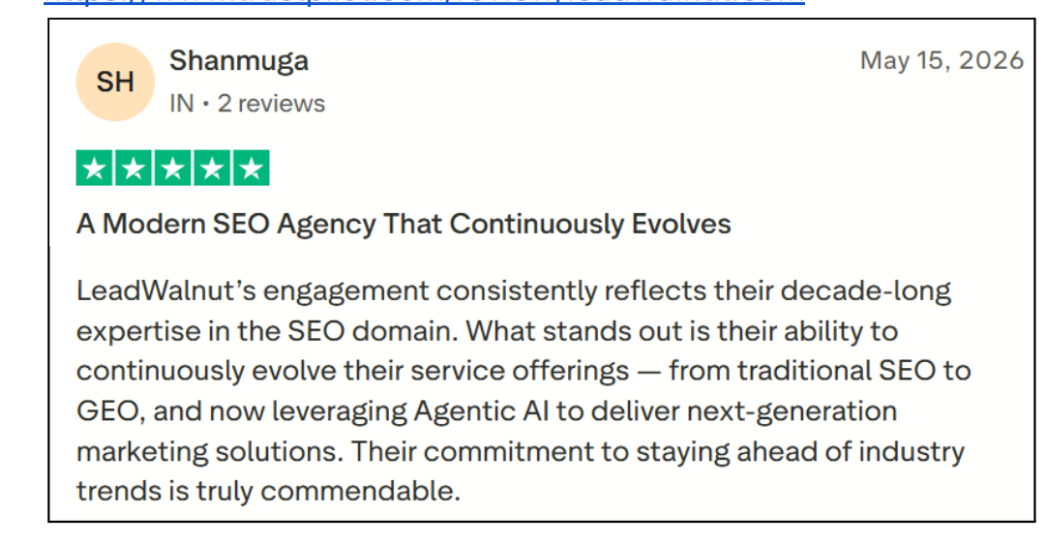
This shift is what clients notice first. As one recent Trustpilot review put it:
FAQ
Is Claude Cowork available on the free Claude plan?
No. Claude Cowork requires a paid plan. It is available on Claude Pro, Max, Team, and Enterprise tiers. The Pro plan starts at around $20 per month and is the minimum entry point for individual marketers. Team and Enterprise plans unlock shared Skills, connectors, and higher usage limits for full SEO and GEO teams working together.
How is Claude Cowork different from Claude Code?
Claude Code is built for developers working inside a terminal or IDE. It reads codebases, writes files, and runs shell commands. Claude Cowork is Claude Code's logic applied to knowledge work. It lives in the desktop, mobile, and web app. Instead of a repo, it works with your files, apps, and connectors like Google Drive, Slack, Ahrefs, and Webflow. Same agentic engine, different surface.
Do I need to know how to code to use Claude Cowork for SEO?
No. Cowork is designed for non-technical users. Skills are written in plain English inside markdown files. If you can write a detailed SOP for a teammate, you can build a Cowork Skill. Most LeadWalnut Skills are 200 to 400 lines of natural-language instructions with no code required.
Which data sources can Claude Cowork connect to for SEO and GEO work?
Cowork connects to the tools SEO and GEO teams already use. Native connectors include Google Drive, Gmail, Google Calendar, Slack, and GitHub. Third-party MCP connectors include Ahrefs, Webflow, Profound, Figma, and Google Search Console. Cowork can also read local files across CSV, XLSX, DOCX, PDF, and Markdown formats, so exports from any tool are fair game.
How long does it take to build a working Cowork Skill for an SEO workflow?
A first working Skill takes two to four hours if you already have the workflow documented as an SOP. Most of that time is spent testing edge cases and locking output format. Reused workflows (like weekly reports or backlink QA) run in under 10 minutes once the Skill is built. The ROI compounds every time the Skill runs after that.


How can LeadWalnut help?

Related Articles
How To Optimize Blog Content For LLMs And Win AI Search Citations
Top B2B Content Creation Agencies Built for SaaS Pipeline in 2026