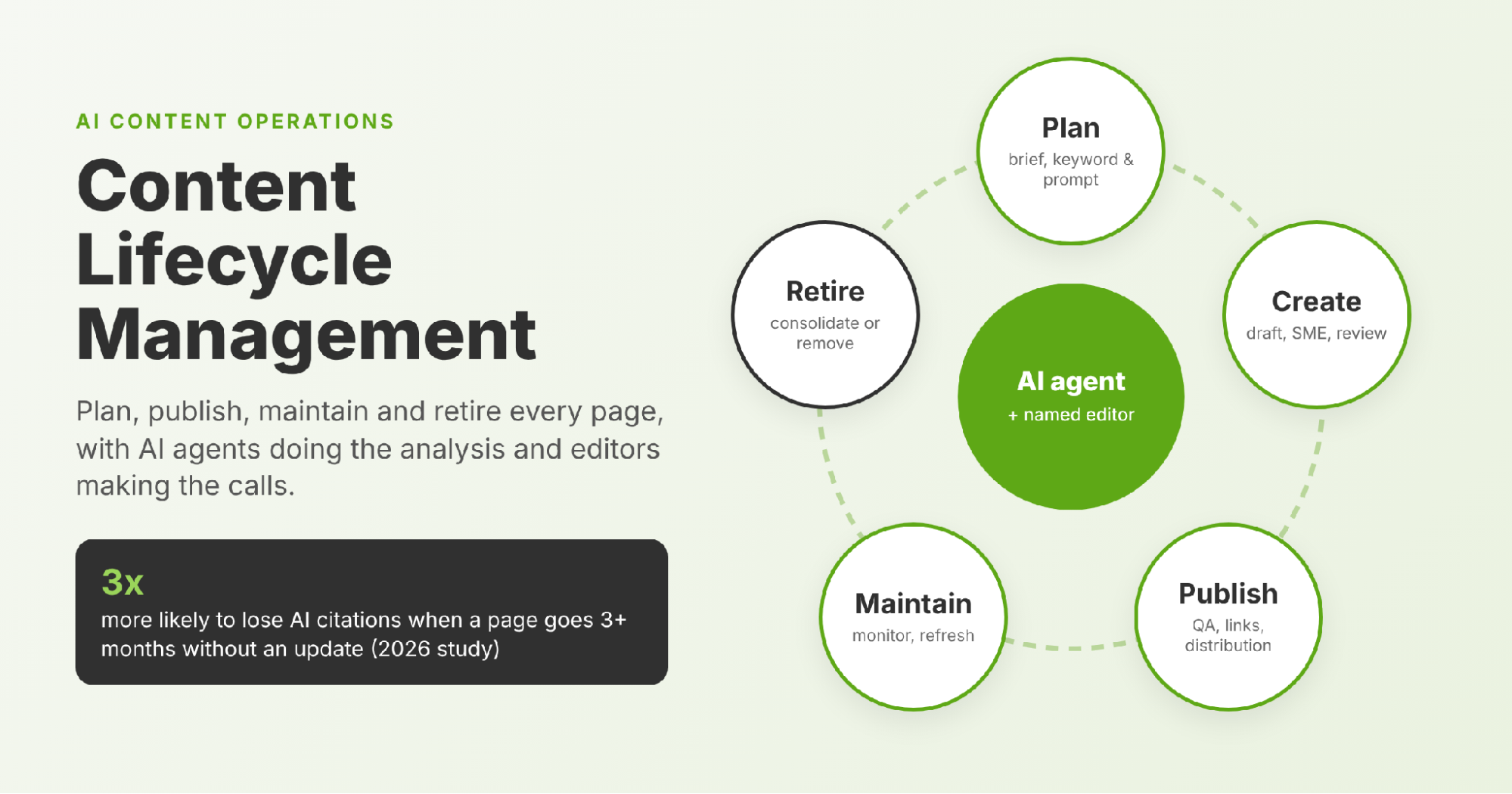
Pages left more than three months without an update are over three times more likely to lose AI citations. That finding comes from a 2026 analysis of millions of datapoints across ChatGPT, Gemini, Perplexity and Google AI Mode.
For B2B teams, this changes what "done" means. Publishing used to be the finish line. Now it is the start of a maintenance cycle.
Content lifecycle management gives that cycle a structure: who plans, who approves, when each page is reviewed and when it is retired. AI agents now take on much of the repetitive analysis, so editors can spend their time on the decisions that need judgment.
What Is Content Lifecycle Management?
Content lifecycle management is the practice of planning, publishing, maintaining and retiring content so every page keeps earning its place. It treats each URL as an asset with an owner, a review date and, eventually, an exit plan.
B2B libraries need it because most teams fund creation and stop at publish. Budgets cover new briefs, writers and launches. Few cover the guide that ranked well two years ago and has been slipping ever since.
Over time, the content lifecycle tilts. The library grows, but the share of pages that still bring in traffic, leads or AI citations shrinks.
It also helps to separate the term from content operations. Content operations is the wider system of people, process and tools that produces content. Lifecycle management is the part of content operations that decides what happens to a page after it goes live.
The 5 Stages of a Content Lifecycle
Most teams fund the first three stages and skip the last two.
Approvals, Archiving and Compliance Across the Lifecycle
Governance holds the five stages together. Role-based permissions decide who can create, edit, publish and delete. Approval workflows lock a page from going live until the named reviewers sign off, which matters when product, legal and marketing all touch the same asset.
Archiving and retiring are not the same thing. An archived asset stays on record but out of active use, while a retired page leaves the site. Every change should carry a date, a reason and an approver, so the team has an audit trail. In regulated categories, add expiry dates to pricing, offers and compliance claims, so they come up for review before they turn into a liability.
Content Playbook: Before and After AI Answers
AI answers have rewritten the content playbook for maintaining a library:
The playbook now has two scoreboards: search rankings and AI answers.
Why Published Content Decays Faster in the AI Era
A page can keep its Google position and still drop out of AI answers. So maintenance now protects AI visibility as well as rankings.
Content decay is the gradual loss of traffic, rankings or citations as a page ages. Four forces drive it:
- Competition: a rival publishes a deeper or more current page on the same topic.
- Intent shift: the query stays the same, but buyers expect a different answer or format.
- Expired facts: stats, product names, screenshots and year references go out of date.
- Freshness bias in AI answers: engines lean toward recently updated sources when they assemble a response.
The same 2026 citation analysis found that more than 70% of cited pages had been refreshed within the past year, and over half within six months. Content decay now runs on two clocks: one for search rankings and one for AI citations. Track both separately, because a page can be healthy on one and failing on the other.
Retire, Optimize or Keep: A Content Triage Framework for Every Page
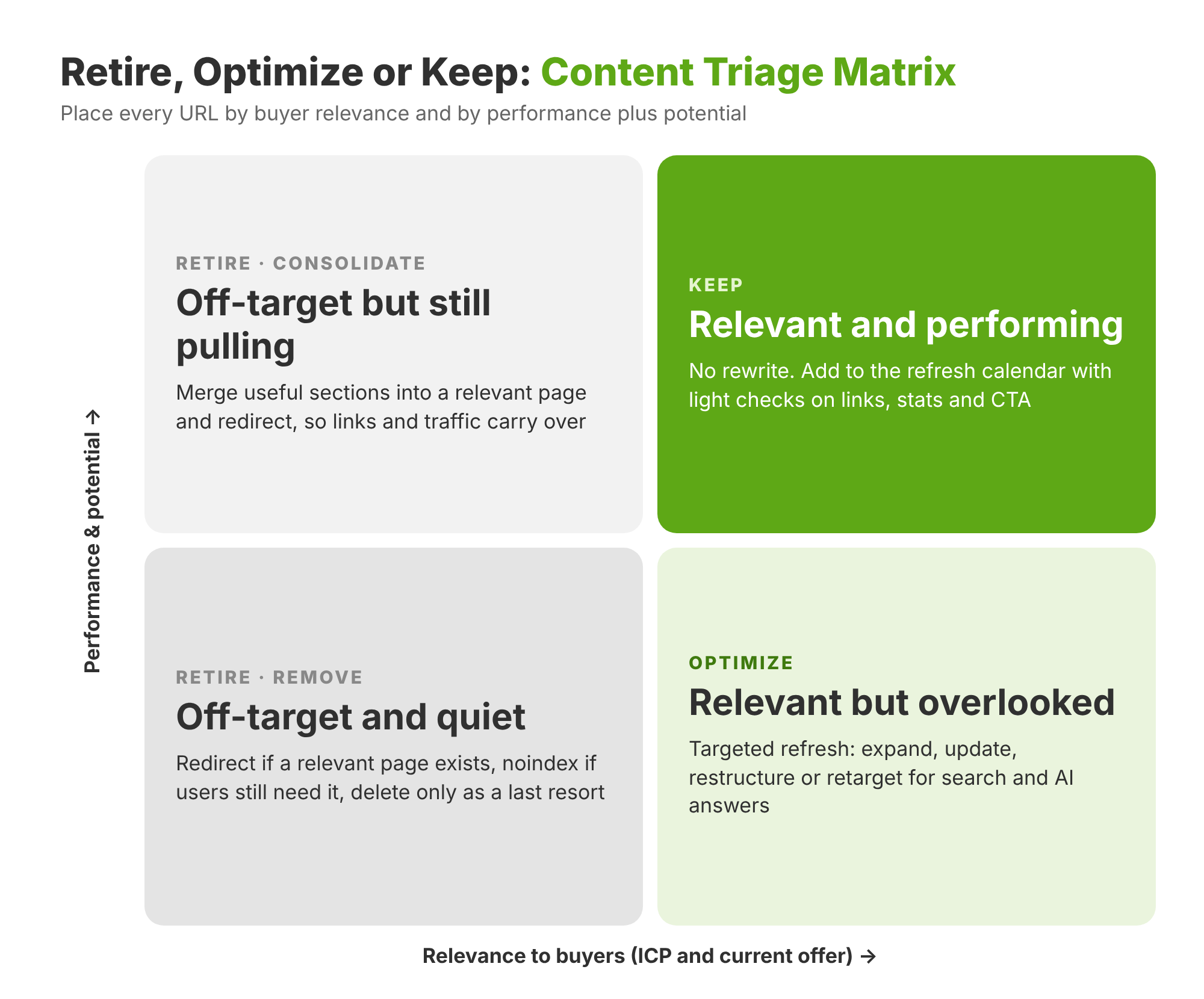
Every URL in the library belongs in one of three buckets. The bucket decides the action and the owner.
Retire Pages That No Longer Serve Your Buyers
Retire pages that have low relevance to the ICP or the current offering: features that no longer exist, old event recaps, off-target topics and thin news posts. This is content pruning, and it comes in two forms:
- Consolidate: merge overlapping pages into the strongest URL, carry over any unique sections and redirect the rest.
- Remove: choose the exit by what remains. Redirect when a relevant page exists. Use noindex when the page must stay for users but not for search. Delete with a 404 or 410 only when nothing relevant exists and no external links point to it.
Library size changes the math. Content pruning pays off most on libraries with thousands of URLs. Libraries with a few hundred posts usually get more from refreshing and consolidating than from deleting.
Optimize Pages Buyers Need but Search Engines Overlook
Some pages answer questions buyers still ask but sit on page two or three, collect impressions without clicks, or rank without ever being cited. These are the highest-return candidates for a content refresh.
Measure each rewrite against Google's guidance on helpful, people-first content: written for a defined reader, built on real expertise and complete enough that the searcher does not need to look elsewhere. For the on-page checklist, see this guide to content optimization.
Keep Pages That Still Rank, Convert and Get Cited
Pages that are relevant and scoring well need no rewrite, only a slot on the refresh calendar. Light checks keep them healthy: working links, current stats and a CTA that matches today's offer.
Keep is a decision, not a default.
Sorting a few dozen pages by hand is manageable. Sorting several hundred on a schedule needs a repeatable workflow.
How to Automate Content Audit and Refresh with AI Agents: 5 Steps
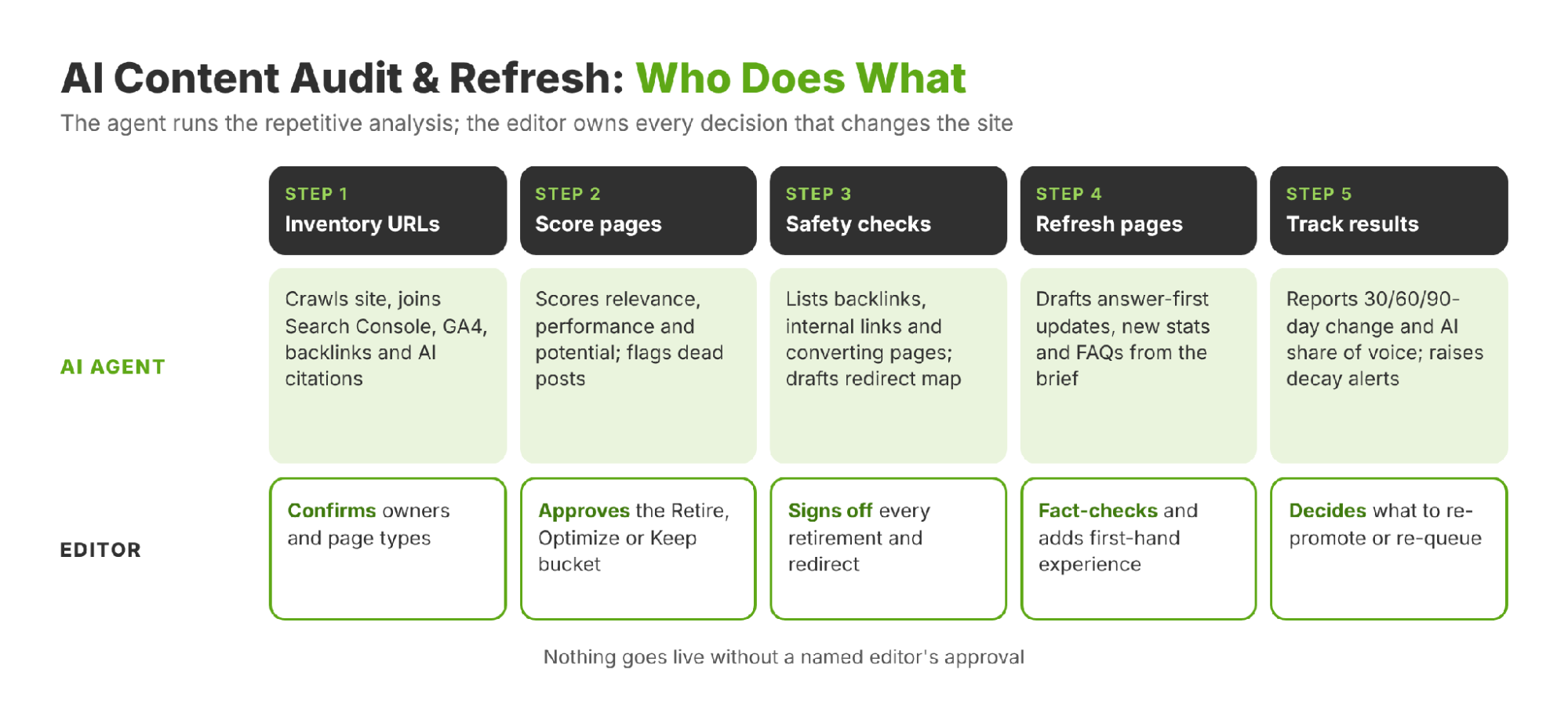
An AI agent runs the repetitive analysis: pulling data, scoring pages, flagging decay and drafting updates. Editors own the judgment calls, such as what to retire, what to rewrite and what goes live. That split is the core of AI content operations. A content coverage analysis agent is one example of this split in practice.
Step 1: Inventory URLs With Search and AI Citation Data
An AI content audit starts with one complete list. Build it in this order:
- Crawl the site and pull the XML sitemap to list every indexable URL, including orphan pages that no menu links to.
- Join Search Console data for the last 12 months: clicks, impressions, average position and CTR per URL.
- Add GA4 engagement and conversions, so every page shows what it contributes to pipeline.
- Add backlinks and referring domains from an SEO tool, to protect pages with external authority.
- Add AI visibility: run the priority prompts buyers ask across ChatGPT, Perplexity, Gemini and Google AI Mode, and record which URLs get cited.
Tag each URL with page type, funnel stage, topic cluster, owner, publish date and last-reviewed date. Without an owner and a review date, the inventory is a snapshot rather than a system.
An agent can repeat steps one to five on a schedule and write the output to a single sheet, so the inventory never goes stale.
Step 2: Score Each Page on Relevance, Performance and Potential
Score every URL on five inputs, then combine them into two scores that place the page on the triage matrix:
The scoring also exposes the "dead blog" problem. A dead blog post has gone quiet on every channel: no meaningful clicks, no conversions and no AI citations across a window the team defines. Dead posts dilute topical focus and make a library look neglected. They go to Retire, unless they answer a question buyers still ask, in which case they move to Optimize.
Scoring shows what to fix in the existing library. A content gap analysis shows what is missing from it.
Step 3: Check Links and Conversions Before Any Page Changes
This is the safety step. Nothing is retired or merged until these checks pass:
- Backlinks: pages with external links get redirected, never deleted.
- Internal links: re-point every link to the surviving URL, in line with the site's internal linking strategy.
- Conversions: a low-traffic page that still converts moves to Optimize.
- Redirect map and sitemap: log every change and update the XML sitemap.
An editor signs off every Retire decision. The agent recommends; a person approves.
Step 4: Update Underperforming Pages for Rankings and AI Answers
A content refresh should be targeted, not a full rewrite. Four refresh types cover most cases:
- Expand: add the subtopics that competing pages cover and this page misses.
- Update: replace stale stats, years, screenshots and product names.
- Restructure: add answer-first openings, tables and FAQs.
- Retarget: realign the page with the query buyers use today.
AI-era: rewrite section openings so a model can quote them as standalone answers, and refresh the entities and sources the page cites. This guide explains how to optimize blog content for LLMs.
Step 5: Track Rankings, Traffic and AI Share of Voice
Compare each refreshed page at 30, 60 and 90 days against its pre-refresh baseline. Track AI visibility for the page's tracked prompts next to its rankings; a growing set of ChatGPT rank tracking tools makes this repeatable.
Then re-promote the update. Share refreshed pages again through the newsletter, LinkedIn and new internal links, so both crawlers and readers notice the change.
At the library level, a short monthly scorecard shows whether lifecycle management is working:
Build a Content Refresh Calendar That Flags Decay Early
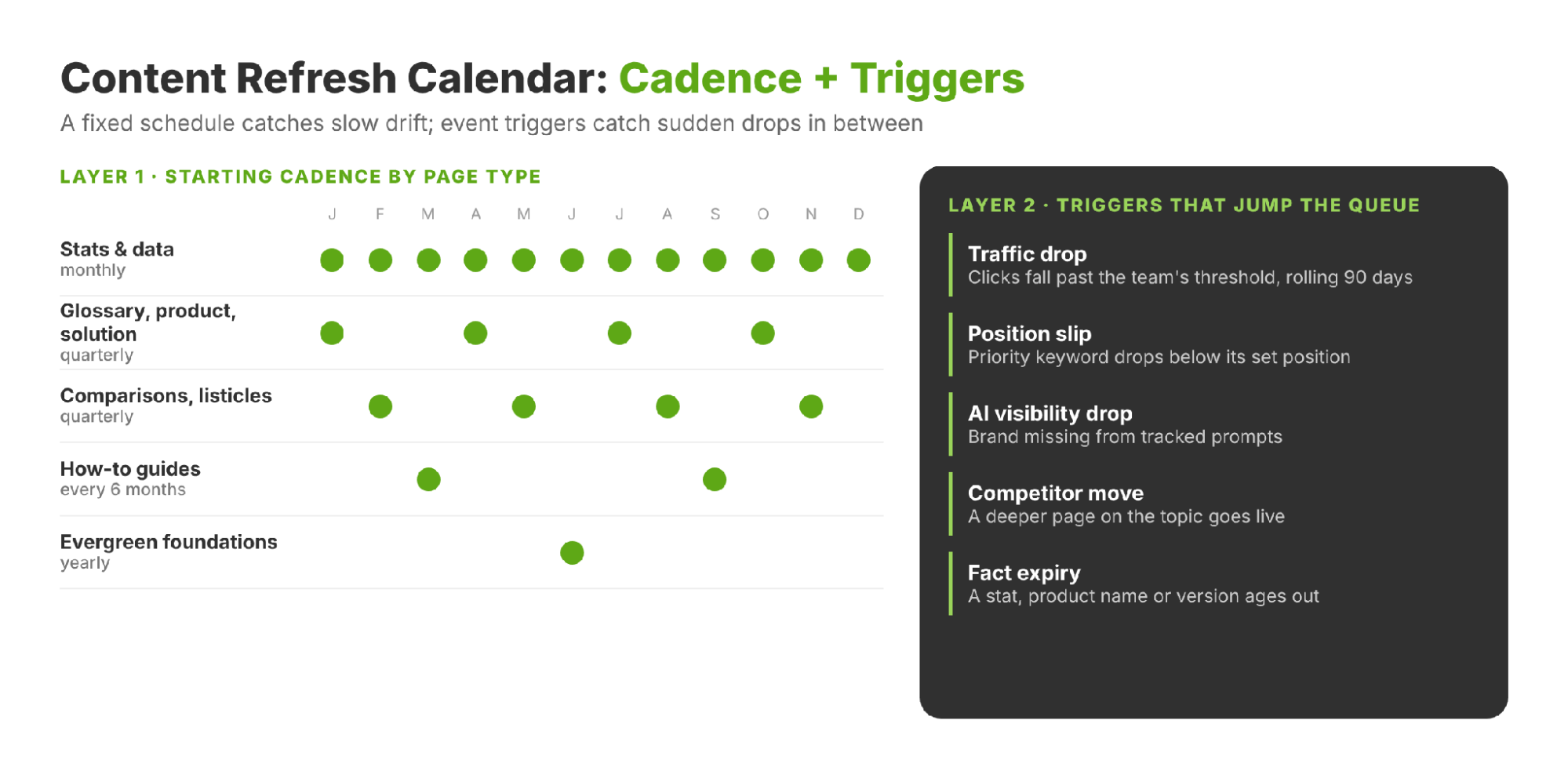
A good refresh calendar has two layers. A fixed cadence catches slow drift. Event triggers catch sudden drops between scheduled reviews.
Set Review Cadence by Page Type
Treat the cadence below as a starting point, then adjust it by how each page performs. It is not a benchmark.
Add Event Triggers That Override the Schedule
Any of these signals moves a page to the top of the queue, regardless of its scheduled date:
- Traffic drop: clicks fall past a set threshold over a rolling 90 days, or impressions hold while CTR falls. The team sets the threshold.
- Position slip: a priority keyword falls below the position the team has set for it.
- AI visibility drop: the brand disappears from tracked prompts.
- Competitor move: a deeper page on the same topic goes live.
- Fact expiry: a stat, product name or framework version ages out.
5 Ways AI Agents Can Create Content That Drives Business KPIs
Users and AI engines are wary of agent-built content for three reasons: unverified facts, generic copy with no first-hand experience, and pages produced at scale with little added value.
Google's guidance is direct on two of these. It asks publishers to fact-check and review all AI-generated content before publishing, and warns that generating many pages without adding value can breach its scaled content abuse policy.
Buyers running agents agree. G2's October 2026 research found that 52% of organizations require human quality review before agent work reaches production, and 77% re-evaluate agent performance at least monthly. AI content operations work when the agent is fast and the process is strict. The five practices below are what separate AI content that ranks from AI content that gets ignored.
Start Every Agent Draft From an Approved Brief
The brief sets the audience, keyword, sources and angle. An editor approves it before the agent writes a word, which keeps the draft on strategy from the first line.
Fact-Check Every Claim Against a Primary Source
Agents predict likely text; they do not retrieve verified facts. Every statistic should link to the original publisher, not to a blog that quoted it.
Add First-Hand Experience Agents Cannot Supply
Client results, screenshots, expert quotes and the team's own point of view are what an agent cannot generate. They are also the strongest E-E-A-T signals a page can carry.
Put a Named Editor Between the Agent and Publish
One accountable editor signs off on every page. Drafts stay drafts until that approval is logged.
Measure Agent Content on Pipeline, Not Page Count
Track leads, demo requests and AI visibility per page. How many pages the agent shipped says nothing about whether they worked.
Make Your Content Library Work Smarter With AI
Content lifecycle management turns a growing pile of pages into a managed library. Five stages give every page an owner. The Retire, Optimize or Keep triage decides what happens next. A refresh calendar, backed by event triggers, catches content decay before it costs rankings or AI citations.
AI sits at the center of that system. In AI content operations, agents handle the triage, refresh drafts and decay alerts; editors make the final calls. For teams without the bandwidth to run it in-house, LeadWalnut's managed content at scale service runs the full lifecycle, from audit to refresh.
FAQ
Does updating the publish date count as a content refresh?
No. Search engines and AI systems look at what changed on the page, not only the timestamp. A refresh means substantive changes, such as new data, added sections or corrected facts. Update the visible "last updated" date and the dateModified schema only when the content itself has changed.
What is the difference between content decay and keyword cannibalization?
Content decay is one page losing traffic, rankings or citations as it ages. Keyword cannibalization is two or more pages from the same site competing for the same query, which splits signals between them. Decay is usually fixed with a refresh, while cannibalization is fixed by consolidating pages into one URL.
How long does a refreshed page take to recover in Google and AI answers?
Google first has to recrawl the page, so small updates can show within a few weeks and larger shifts often take one to three months. AI engines vary: those that search the web live can pick up changes quickly, while others update less often. The 30, 60 and 90-day checks capture both.
Who should own content lifecycle management in a small marketing team?
One person should own the calendar and the Retire decisions, usually the content lead or marketing manager. Writers own the Optimize work on their pages. An SEO specialist, freelancer or AI agent can handle the data pulls, with a quarterly review where the owner signs off on changes.
Is content lifecycle management the same as a content management system (CMS)?
No. A CMS is the software that stores and publishes content, such as WordPress, Webflow or Contentful. Content lifecycle management is the process and governance that decides what happens to each page over time. A CMS can support it with workflows and permissions, but it does not make those decisions.



How can LeadWalnut help?

Related Articles

How to Reach Buyers in a Zero-Click Search Landscape

How to Automate the SEO Journey With AI Agents